
Professional Security Systems Installation in Melbourne

The call usually starts the same way in Melbourne. A homeowner has a front door that feels exposed, or a shop owner has just noticed the rear lane is too easy to reach, and suddenly the brief is bigger than “put a camera up.” The job is to work out what needs protecting, what can be seen, and what needs to keep working when the site is busy, closed, or under pressure.
A proper security systems installation doesn't begin with a ladder. It begins with a risk assessment, a property walk-through, and a written plan that tells the client what's worth protecting and why. That plan should be clear enough that the client can use it with one installer or another, because the right outcome is a system that fits the property, not a quote padded with hardware.
Table of Contents
How a Professional Security Installation Actually Starts in Melbourne
On the Tools Cabling, Mounting and Coordinating Other Trades
How a Professional Security Installation Actually Starts in Melbourne
A Melbourne small-business owner rings up after closing time, usually because something about the premises no longer feels passive. Maybe the back entry is hidden from the street, maybe staff are sharing a single key, or maybe the current setup is a mix of old gear and guesswork. The first conversation should sound less like a sales pitch and more like a structured risk discussion.
A good installer asks about who uses the property, when it's occupied, which doors are used, where the weak points are, and whether the client wants evidence, deterrence, monitoring, access control, or all three. That's the difference between a sales quote and a security plan. A quote lists devices, while a plan links each device to a specific entry point or operational risk.
PeakFriend's model reflects that approach, with a free, property-specific security assessment and a written protection plan delivered within one day. That's the sort of handover a client can take to another installer if they choose, because it frames the job around the site rather than around a generic package. For readers comparing approaches, this practical contrast between professional and DIY security is useful context.
Practical rule: if the first visit doesn't identify entry points, device roles, and the way the property is used day to day, the install is still only half scoped.
Once the client signs on, the rest of the job becomes execution. The system gets selected, programmed, and installed to the property, not squeezed into a template. That early clarity matters in Melbourne because terrace homes, shopfronts, apartments, and light-industrial spaces all demand different coverage, different cable paths, and different handover expectations.
Mapping the Property Before a Single Cable is Run
The best installs are won on paper, then confirmed on site. Before any cable is pulled, the technician should walk the property, identify entry points, check sightlines, find the network and power positions, and note where blind spots could appear. That sequence reduces rework later and keeps the final system tied to the building instead of to assumptions.
The installer's plan usually starts with the control panel or NVR location. It needs power, a sensible route to the network, and enough protection that it's not the first thing an intruder reaches. From there, sensors and cameras get mapped to actual movement and use, not just to empty wall space. Industry installation guidance also stresses motion sensors in room corners, roughly 6 to 8 feet above the ground, aimed away from windows and heat sources so they're less likely to trigger unnecessarily, and door/window contacts need precise alignment so the circuit closes cleanly when shut. That guidance aligns with the workflow in Acre Security's installation steps for intruder alarm systems.

A written map also helps the client think through what's really being covered.
Entry Points: list every door, window, roller access, and secondary entry, then rank how exposed each one is.
Sensor Zones: define where motion detectors will be placed so coverage follows movement patterns.
Blind Spots: identify anything a camera or sensor can't see before the walls are closed up.
Cable Pathways: plan routes that minimise exposed cabling and reduce DIY errors.
A site-specific plan is what turns the job into a single-day installation instead of a string of callbacks. It also makes nuisance-alarm reduction part of the design, not a patch applied after the client's first false trigger. For anyone weighing wired against wireless, the right answer often comes down to the property's layout and how much access there is for proper routing, which is why wired and wireless system choices need to be judged against the building, not the brochure.
On the Tools Cabling, Mounting and Coordinating Other Trades
Once the plan is locked, the actual site work starts. Melbourne buildings don't always give up their walls easily, and cable paths get blocked by brick, insulation, tight roof spaces, old renovations, or previous trades who left little room to move. That's where advanced cabling techniques matter, because the wiring still has to be efficient, durable, and neat enough that the finished job looks intentional.
A front entry or shop hallway is a client's first impression. Loose cable runs, visible joins, or poorly finished penetrations make the whole installation feel improvised, even when the electronics are good. Technicians who care about the site will protect finished surfaces, label every run, and photograph wall cavities before closing them up, because those details save time when the client needs service later.
A neat installation isn't cosmetic only. It makes troubleshooting faster, makes future upgrades cleaner, and gives the client confidence that the job was done with discipline.
Coordination with other trades is just as important. Electricians, builders, painters, and security technicians all have different dependencies, and if nobody owns the sequence, they end up in each other's way. A clear implementation plan should spell out who's doing what and when, so the cable runs happen before the plaster goes in and the devices get mounted after the surfaces are ready.
That planning discipline is what makes a same-day result realistic. If the access route, power position, and device locations are agreed before anyone picks up a drill, the install feels orderly instead of crowded. When a cable route is blocked, the answer isn't to compromise the end result, it's to reroute cleanly and preserve the property finish, especially in retail spaces where the security system is also part of the shop's presentation.
Installing Alarms CCTV and Access Control Together
A Melbourne install often pulls three layers into one job. The alarm watches for intrusion, CCTV records what happened and discourages repeat attempts, and access control manages who gets through the door without a bowl of spare keys sitting on the counter. Each system has its own device placement, cabling, and setup needs, so bundling them only works if the installer plans how they interact from the start.
Comparison of alarm, CCTV and access control installation | Core devices | Typical install work | Key placement decision |
|---|---|---|---|
Alarm | Door and window contacts, motion sensors, sirens, control panel | Mount, wire or pair, zone, test, and set entry delays | Put contacts on real access points and sensors where movement is meaningful |
CCTV | PoE IP cameras, NVR, network connection | Mount, run data and power, pair cameras, set recording and remote viewing | Aim for usable evidence, not just broad coverage |
Access control | Video doorbells, touchscreen hubs, smart locks | Fit, connect, enrol users, and configure app access | Place devices where arrival, verification, and unlocking all make sense |
The alarm side usually gets priority on a job because it is the first line that has to behave cleanly. Door and window contacts need proper alignment, motion sensors need coverage that matches how people move through the property, and sirens need enough presence to deter, not just notify. CCTV is more visual, but it still depends on careful placement, because a bad angle gives you blind spots and weak evidence when you need to review an incident later. Access control sits between the two, since a video doorbell, hub, or smart lock has to work as both a convenience layer and a security layer.
Melbourne clients often ask about brands such as Hikvision, Ajax, Dahua, Bosch, and Uniview because those names appear often in professionally installed systems. Brand matters less than how the system is set up. Clean device placement, correct zoning, and app access that works without half-finished accounts matter more than the label on the box. PeakFriend's published system range includes alarm and intrusion detection, HD CCTV, and smart access components, which suits the bundled approach many homes and small businesses end up using.
For readers comparing camera options before a job starts, our guide to the best security cameras for home in 2025 gives a practical breakdown of sensor types and resolution needs.
A good install makes the property feel like one working environment, not three separate products competing for attention. That is the difference between buying devices and buying a security outcome.
The Live Quality Check Before Handover
Handover should feel like a live calibration session, not a paperwork exchange. The technician and client should walk the premises together, trigger sensors, inspect camera views on a live screen, and confirm that the system responds the way the property needs it to. Small mistakes show themselves at this stage before the site goes live.
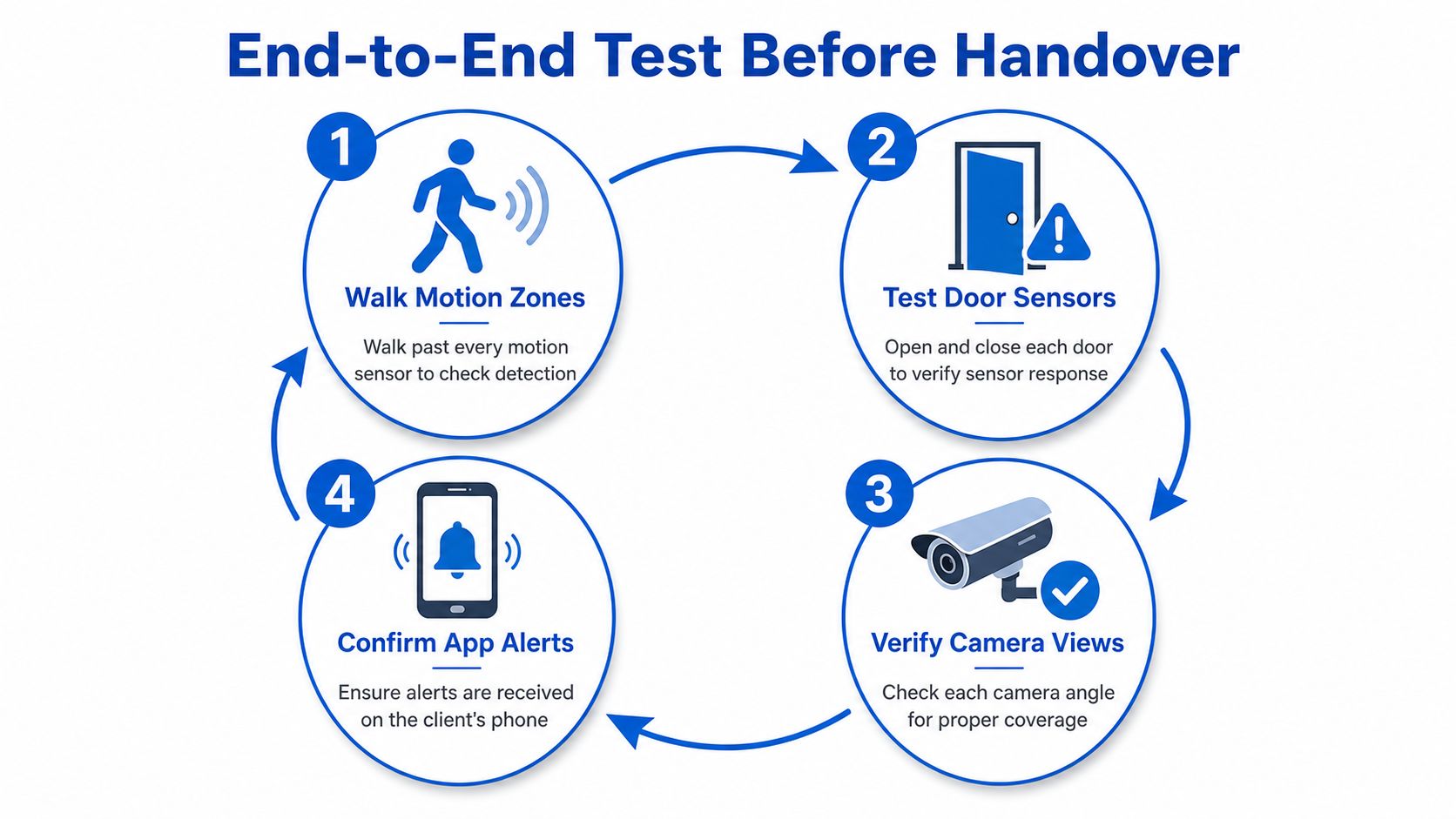
The check should be thorough, not casual.
Walk Motion Zones: walk past every motion detector and confirm the area is being seen properly.
Test Door Sensors: open and close each door and window contact to verify the signal is clean.
Verify Camera Views: inspect each camera angle for coverage, evidence quality, and edge blind spots.
Confirm App Alerts: make sure the client receives alerts on their phone and understands what each notification means.
The source material on installation testing supports this approach, because it treats the final test as a calibration exercise covering sensor response, communications, battery level, tamper response, and app function. That aligns with professional practice. A system that hasn't been tested live may look finished, but it hasn't proved anything about real use.
There's a useful order to the checks. First, motion coverage. Then, contact response. Then, camera framing and cable integrity. Finally, communications and alert delivery. The earlier sections covered where the devices go, but the handover proves whether those choices were right in the building, with the users standing there.
A final note from the trade side is simple. The client should leave knowing how to arm the system, how to check status, and what happens if a sensor or connection fails. That's the point where the system becomes usable rather than just installed.
Privacy, Strata and Outage Resilience in Melbourne Installs
The most overlooked part of camera design isn't resolution, it's restraint. In Melbourne homes, apartments, and shared sites, cameras need to avoid filming bathrooms, bedrooms, and places where people reasonably expect privacy. They also need to be angled so they don't capture a neighbour's property or a shared area without good reason.
That issue matters in strata settings, especially for townhouses, apartment balconies, shared driveways, and building entrances. Body-corporate rules can shape what gets mounted, where it can point, and who has access to the footage. A good installer doesn't just ask where the camera will see the most. They ask where it can see enough without overreaching.
The idea that more cameras automatically means better security breaks down quickly in a shared setting. A better install balances evidence quality, privacy minimisation, and the reality of local compliance. That's also where a property-specific plan earns its keep, because the coverage should fit the site's boundaries as well as its risks.
The other blind spot is resilience during an outage. A cloud-heavy or app-based system can be convenient, but it shouldn't be assumed to stay fully functional when power or internet drops. Melbourne weather and network disruptions make battery backup, mobile failover, and local recording worth asking about before the job is signed off. If those pieces aren't part of the design, the system may look advanced but still leave gaps when the connection is lost.
The practical question is not how many cameras are installed, it's what still works when the building is under stress. That's the point where good installation separates itself from attractive hardware.
Handover, App Training and the Yearly Service Loop
A proper handover teaches the client how to live with the system, not just how to switch it on. Staff permissions, family access, app notifications, and basic response habits all need to be set while the technician is still on site. If the client doesn't understand the app, the system becomes a collection of features nobody trusts.
The yearly service visit matters for the same reason. Batteries age, sensors drift, connections loosen, and property use changes after renovations or tenant turnover. A technician who checks sensors, batteries, and communication paths each year keeps the system aligned with the building instead of letting it slowly slip out of spec.
The best security systems are maintained like any other protection asset, with a simple register, regular self-tests, and a service record that stays current.
For homeowners and small businesses alike, a basic asset register helps. It should note where devices are located, which areas they protect, and when the last check happened. That record is useful after a renovation, after a staff change, and when insurance paperwork needs support. PeakFriend's service model includes annual maintenance, app setup, and ongoing support, which fits that long-term loop without turning the system into a one-off job.
The strongest installations in Melbourne aren't the flashiest ones. They're the ones that were scoped properly, installed neatly, tested live, and checked again after the property changed.
If you want a Melbourne security system that's scoped to the property, installed cleanly, and supported after handover, speak with PeakFriend Security. They handle assessment, installation, app setup, and ongoing service for homes and small businesses that need the system to keep working long after day one.
Produced via Outrank