
CCTV Home Installation: A Step-by-Step Melbourne Guide

A parcel has gone missing, the side gate has been left open, and the camera above the garage shows a person without showing their face. For a Melbourne homeowner comparing camera kits, the difficult part isn't finding more cameras. It's knowing whether the finished system will capture something useful when the front gate opens after dark.
CCTV home installation should be judged by recorded evidence, not camera count. A sound job starts with approach routes and finishes with night testing, secured app access and a homeowner who can retrieve a clip without calling the installer.
Table of Contents
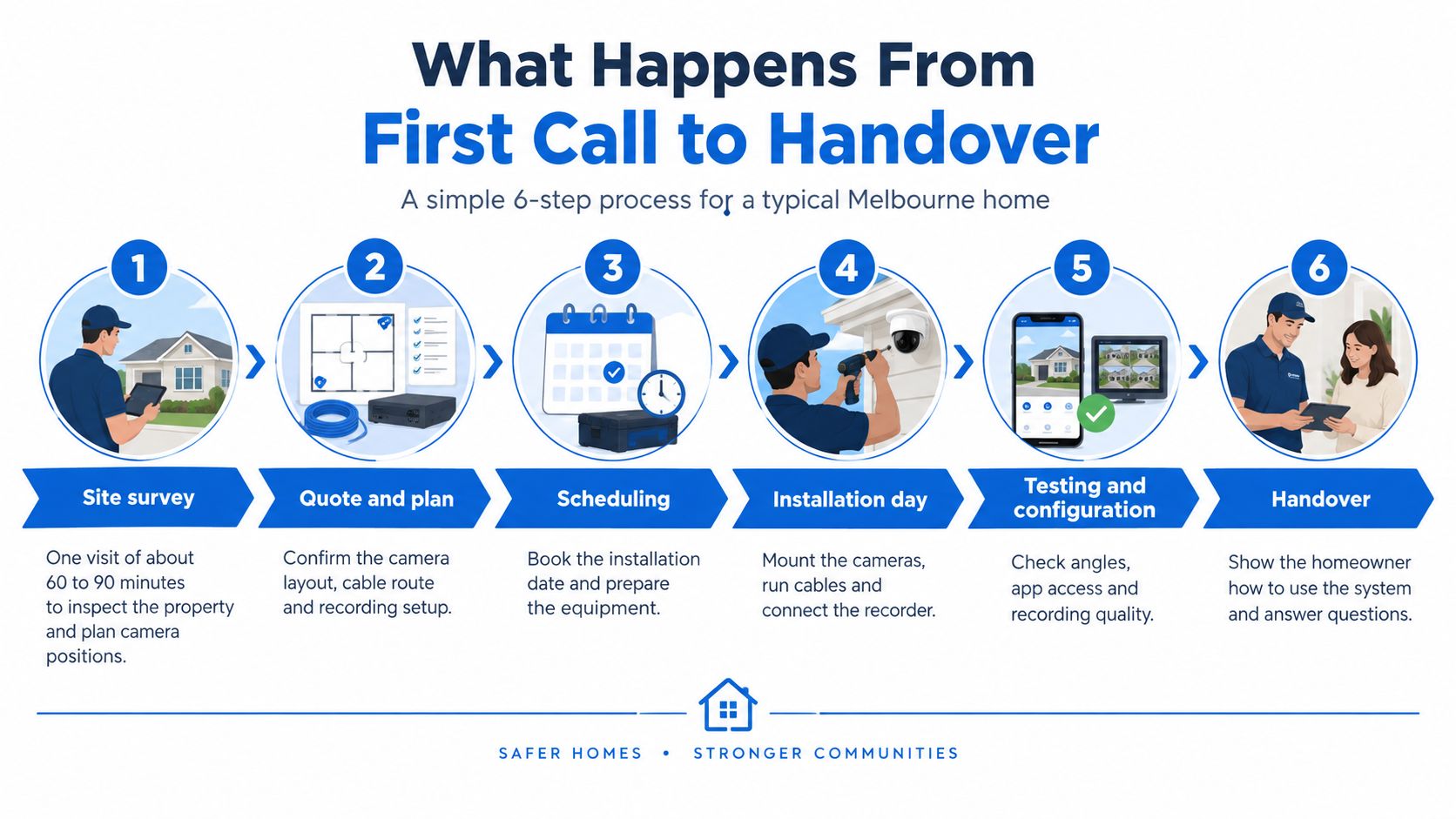
What Happens From First Call to Handover
The sequence is straightforward: survey, plan approval, installation, testing, app handover and an early review. Consider an illustrative Melbourne home with four to six cameras, accessible roof space and a recorder cupboard near the router. The schedule below is a planning example, not a guaranteed duration for every property.
Installation timeline for a typical Melbourne home
Phase | Typical time | What you get |
|---|---|---|
1. Site survey | Allow 60 to 90 minutes, one visit, in this example | Sketch of entry points and camera roles |
2. Plan sign-off | Before any drilling | Written plan with each camera's purpose, position, recording and retention |
3. Installation day | Allow one day for four to six cameras in this example, longer with concealed cable | Fixed cameras and labelled cable diagram |
4. Testing | Same visit where lighting permits, including day, night and glare checks | Acceptance results agreed with the homeowner |
5. App setup and handover | Same visit | Alerts configured and walkthrough complete |
6. First-week check | Week one of this example schedule | Footage and alerts reviewed, sensitivity adjusted |
The process overview shows the booking and installation milestones.
Open cable routes in a renovation simplify the work; concealed runs through a finished brick home require more investigation. If installation finishes before sunset, the booking must include an agreed after-dark test rather than treating a daylight inspection as completion.
The timeline and sign-off should be written down before booking. Changing a proposed position on paper is cheaper than moving a bracket and repairing a wall.
How to Survey Your Property's Entry Points
The survey starts at the street, not beneath the front porch. Victoria Police's CCTV guidance recommends covering entry and exit points, the driveway and the street directly in front of the home, while keeping cameras visible and supporting them with sensor lighting and alarms.
Walk the routes before choosing equipment
Follow the approach from the footpath. The surveyor walks towards each entrance as a visitor would, then considers less obvious approaches. A camera needs a useful view before someone reaches the door, not merely a recording of their back as they leave.
Mark every access point. Doors, accessible windows, side gates, garage doors and rear lanes belong on the sketch. A roller door and the pedestrian door beside it are separate access points, even when they share a wall.
Identify concealed areas. Fences, hedges, wheelie bins and parked vehicles can hide the route into a side passage. The surveyor should check the view with the bins in their usual collection position and the family car parked normally.
Record the lighting conditions. Note porch lights, streetlights, security lights and dark transitions between them. A bright fitting directly behind a visitor can leave their face dark, while a light close to the lens can produce glare.
Locate power and network connections. Mark the router, available network outlets, power points and potential recorder locations. The cable route matters as much as the straight-line distance, particularly where extensions or finished ceilings interrupt access.
Flag privacy boundaries. Neighbouring windows, shared driveways and tenant areas need deliberate treatment. Marking them now prevents an apparently convenient mounting point becoming an unsuitable view later.
A Hawthorn terrace example
Consider a Hawthorn terrace with a well-lit front porch and a narrow side passage behind a high gate. A camera above the front door might document deliveries perfectly while missing someone moving along the fence towards the rear kitchen door.
The useful addition is a view along that passage, positioned so an opening gate doesn't block it. A door contact can detect the rear door opening, while the camera records who approached it. Those devices perform different jobs.
Survey deliverable: A homeowner should receive a sketch of access points, a stated role for each proposed camera and notes describing the lighting each view must handle.
The sketch should also identify any unresolved issue, such as a hedge requiring trimming or a cable route needing inspection. Equipment selection shouldn't conceal those gaps behind a larger camera package.
Privacy, Strata and Neighbour Rules Before Placement
Legal and permission checks belong before drilling. The Office of the Australian Information Commissioner's security-camera guidance explains that private residential surveillance may still be subject to state or territory surveillance-device laws, local-council requirements and strata by-laws.
Resolve the boundaries
Building permission: Establish whether owners corporation rules restrict fixing cameras to the façade or common property.
Field of view: Identify shared driveways, neighbouring windows, tenant areas and unnecessary footpath coverage.
Use of footage: Determine whether a business, landlord or property manager will access recordings, and which obligations apply.
For organisations covered by the Privacy Act, people must be notified before recording, recorded personal information must be secured, and information must be destroyed or de-identified when no longer needed. Business use doesn't automatically settle whether the Act applies; that assessment needs to be explicit.
Privacy masking should exclude neighbouring bedrooms, bathrooms and other unnecessary areas. Each mask should appear in the written plan and be checked in recorded playback, not just live view.
For a townhouse sharing a driveway, any relevant neighbour or owners corporation agreement should be documented before approval. Mixed residential and trading premises also warrant the access and notification considerations discussed in this guide to CCTV cameras for shops.
Where to Mount Each Camera for Faces and Plates
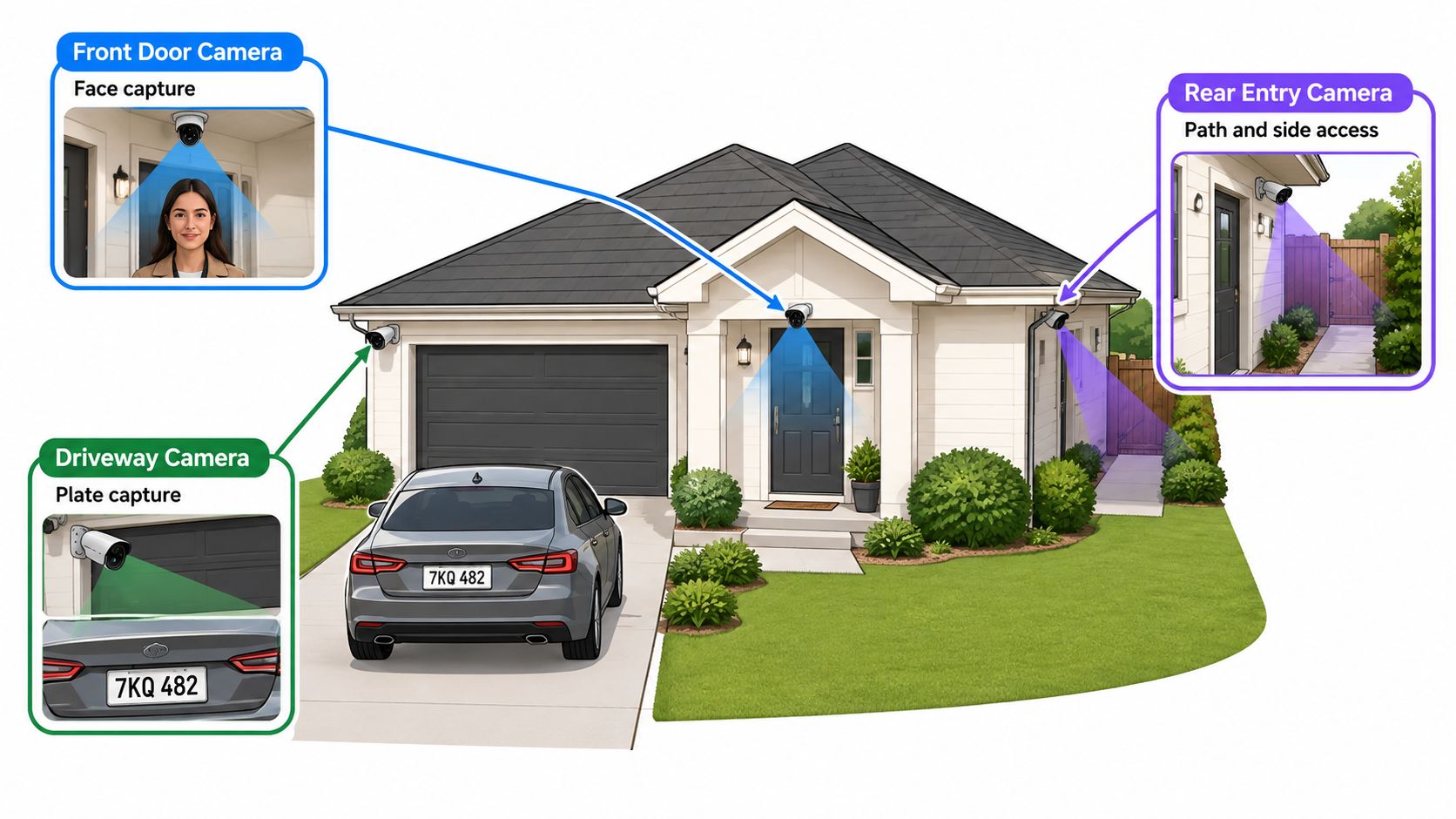
Choose the identification task before choosing the bracket position. A front-door camera needs facial detail at the step. A driveway overview needs to explain vehicle movement. A camera expected to read plates needs a sufficiently tight view of a defined capture point.
The zone diagram illustrates how those jobs can be separated.
Set a height, then prove the view
For a hypothetical layout, a front-door trial position might be 2.1 to 2.4 metres above the landing. A driveway trial might use 2.8 to 3.0 metres, with a plate capture point 5 to 10 metres away. These are worked-example starting positions, not guaranteed identification distances or universal mounting rules.
Typical mounting heights and aims by location
Location | Aim | Common problem |
|---|---|---|
Front door | Face detail at the step; trial a lower, protected position | Porch light glare at night |
Side gate | Identify people entering; mount clear of the gate's swing | Hedge or bin blocking the view |
Rear door | Entry and exit evidence; avoid a steep overhead angle | Dark yard with no lighting |
Garage | Door and vehicle detail; keep the bracket clear of moving hardware | Backlight from the driveway |
Driveway | Vehicle and plate detail at a defined capture point | Too wide, plates too small |
Street frontage | Identify who approaches the home within the necessary frontage | Pointing into neighbours' windows |
The front-door trade-off is facial angle versus tamper resistance. Too high, and the camera records hair and hats. Too low, particularly near ground level, and it becomes easy to obstruct while producing an awkward identification angle.
The driveway trade-off is width versus detail. A broad image may show the whole forecourt but leave a plate too small to read. Enlarging that recording afterwards doesn't restore detail the camera never captured.
Avoid optical and digital weak points
Queensland Police's CCTV guidance identifies lens selection, focus, exposure and lighting performance as important design considerations. Aiming directly towards low sun or a porch fitting can defeat an otherwise suitable camera.
Equipment selection also needs a support-life check. The Department of Home Affairs' smart-device security guidance states that mandatory standards commenced on 4 March 2026, primarily covering products manufactured on or after that date, including a prohibition on universal default passwords for covered devices. That doesn't automatically secure an older recorder.
Before fixing each position, the installer should:
Match the sketch: Confirm the camera still performs its assigned role.
Check the actual lens: Test the view on site rather than trusting a product image.
Resolve lighting: Identify any capture zone requiring supplementary illumination.
Confirm suitability: Compare mounting, recording and access needs when selecting a CCTV camera for home use.
How Installation Day Runs, Step by Step
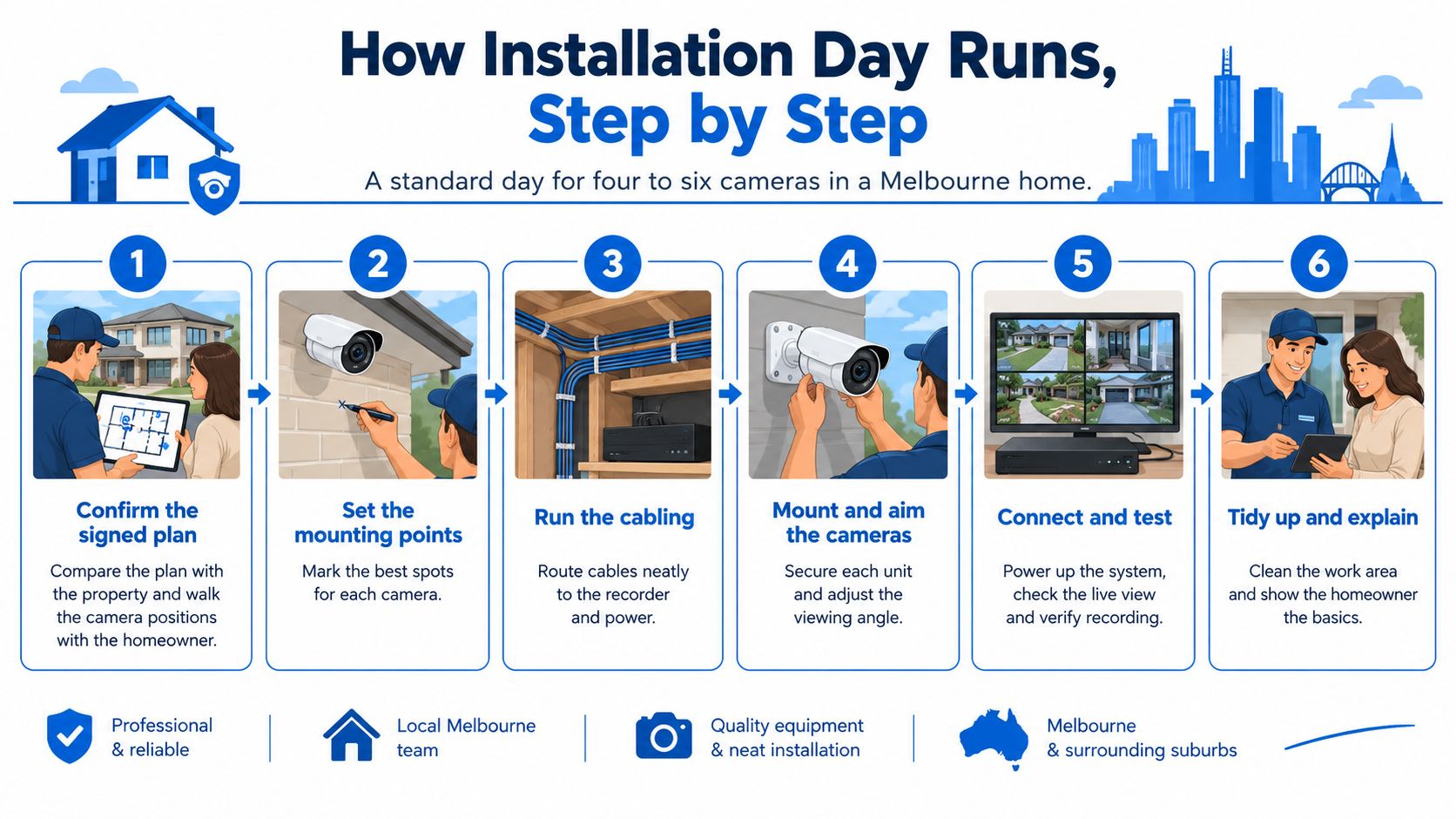
Installation starts with the signed drawing and a walk around the property. For the illustrative camera layout, the homeowner and technician should settle any changed assumptions before equipment comes out of the van.
The installation overview summarises the physical work.
From marked positions to a working recorder
Confirm the signed plan against the building. The technician walks the proposed positions with the homeowner, checking gate swings, parking positions and recent changes. Any departure from the approved layout should be recorded before drilling.
Establish safe cable routes. The installer checks accessible roof or subfloor spaces and identifies gas, water and electrical services. Concealed services require appropriate detection and investigation; a convenient straight line isn't permission to drill.
Fix the brackets securely. A drill, suitable masonry or timber fixings, a level and the correct mounting accessories belong at this stage. Brackets need a sound substrate, and external penetrations need weather sealing without blocking equipment drainage.
Run and label the cables. Cables terminate at the planned recorder position, usually somewhere ventilated and reasonably close to the router. A cable tester verifies the terminations before the technician hides joints or closes access panels.
Connect the power arrangement. Compatible Power over Ethernet equipment carries camera data and power through the network cable; other equipment needs suitable local supplies. The installer checks the switch's power capacity and protects outdoor connections in appropriate enclosures.
Connect the recorder to the network. Reserved or properly configured fixed addresses make devices easier to locate and maintain. The technician checks for address conflicts and confirms that recording continues independently of whether the phone app is open.
Name the views clearly. Front Door, Side Gate and Driveway produce understandable alerts. Generic numbered names leave household members guessing which part of the property needs attention.
Clean up and document the installation. Offcuts, dust and packaging should leave with the technician. The homeowner receives a labelled cable diagram showing the recorder, cameras and network connections.
Inspect the installation, not just the screen
The following video provides an additional installation reference.
A tidy image on the monitor doesn't prove that the physical work is sound. External cable should be protected from weather and accidental damage, connectors shouldn't hang exposed beneath eaves, and the recorder needs accessible ventilation.
Common installation slips: Cable runs beyond the selected equipment's supported limits, a recorder shut inside an overheating cupboard, and unreadable camera names all create avoidable maintenance problems.
Where existing cabling is reused, its condition and test results should be documented. Reusing an untested cable to save opening a ceiling can leave the homeowner with intermittent recording that appears only after the technician has gone.
Testing Angles, Coverage and Night Performance
A clear live picture at midday is not an acceptance test. The homeowner needs to see recorded playback under the conditions that matter, including darkness, low sun and movement through the property.
Standards Australia's AS/NZS 62676.4:2020 covers the planning, selection, installation, commissioning, maintenance and testing of video surveillance systems. Its application supports evaluating the complete system against defined requirements rather than accepting an advertised resolution as proof of performance.
Agree on observable pass results
Acceptance tests before sign-off
Test | When to run it | Pass result |
|---|---|---|
Daytime face check | Midday, facing the entry | Face is identifiable at the mount's target distance |
Night infrared check | After dark, with porch lights off | Faces and plates readable in their designated capture zones, no heavy noise |
Glare check | Late afternoon, low sun | No washed-out frame or lost detail |
Blind-spot walk | Walk from footpath to rear door | No gap in coverage on the planned route |
Motion alert test | Walk through each zone | Phone alert arrives promptly, with a few seconds used as an illustrative acceptance target |
Remote playback test | Away from home on mobile data | Live view and recorded clip both load |
Retention check | Review recorder settings | Retention matches the stated plan |
Alert timing is a test outcome, not a guarantee independent of the home connection, mobile network and notification service. Any unacceptable delay needs investigation before the homeowner relies on it.
A night check should include normal lighting as well as the lights-off condition. Infrared reflected from a nearby wall, spider web or number plate can overwhelm useful detail, even when the rest of the yard looks clear.
Change one thing and retest
Consider a hypothetical driveway camera that produces a readable plate at noon but a grey blur at 9 pm. The technician trials a lower position and moves supplementary lighting away from the lens axis, then repeats the same vehicle approach. The correction only passes if the saved recording shows the required detail.
The homeowner should also walk from the footpath towards the rear door while another person watches playback. Gates should open, the garage door should move and the car should remain in its normal position during the test.
Lost detail: Adjust framing, focus, exposure or lighting to suit the capture task.
Coverage gap: Change the position or assign another view to the missing route.
Privacy exposure: Correct the angle or mask and inspect the resulting recording.
A failed test needs the same scene repeated after the adjustment. A changed setting is not evidence that the problem has been fixed.
App Setup, Security Hardening and Handover
A default administrator password can leave a functioning camera system poorly protected. Installation isn't complete until the homeowner controls the accounts, understands the recording arrangements and can retrieve an event.
The handover checklist combines account protection with practical operation.

Secure the accounts and connections
Replace administrator credentials: Every device and cloud account needs a unique password stored in a password manager. The homeowner should control the recovery email rather than depend on a technician's personal account.
Enable multi-factor authentication: Where supported, protect sign-in with an additional verification step. Recovery codes should be stored securely and separately from the phone.
Check firmware and support: Record the model and installed firmware, apply suitable updates and establish whether the manufacturer still supports the equipment. Unsupported devices need an explicit replacement decision.
Separate the camera network: A dedicated IoT network or properly configured network segment can restrict access to household computers. A basic guest network may block recorder discovery, so segmentation must be tested rather than switched on blindly.
Limit permissions: Household members need individual access suited to their responsibilities. Administrator control and footage export should be restricted to named people.
Verify encrypted remote access: The technician should explain how the remote connection works and avoid casually exposing recorder services to the internet. Unnecessary remote features should remain disabled.
Make the app useful rather than noisy
Motion zones should follow activity that needs a response. A front-door approach and movement inside the driveway may warrant notifications; passing traffic and a neighbour's swaying tree generally don't.
The installer should demonstrate the difference between an alert zone and a privacy mask. Suppressing a notification doesn't necessarily stop the underlying scene being recorded.
The homeowner then performs the walkthrough:
Trigger an event: Walk through the nominated zone and identify the correct camera in the notification.
Retrieve the recording: Find the event on the timeline and play the saved clip, including the lead-up where configured.
Export appropriately: Save a usable clip with the correct time and understand who may receive it.
Check recovery: Confirm the process for a lost phone, forgotten password or changed internet router.
Storage arrangements must name the responsible party, not merely state that recordings are in the cloud. PeakFriend Security does not store or retain camera footage; all footage is processed and stored exclusively by its trusted monitoring partner. The agreed retention period and authorised access should be documented accordingly.
Keep access current
An annual review should check user lists, firmware status, recording health and account recovery details. Staff or tenancy changes require prompt removal of access and replacement of any shared credentials, rather than waiting for the next service visit.
The homeowner should leave the handover with account ownership established, documentation stored safely and a clear support contact. A working app on the technician's phone isn't a completed handover.
Book a Site Survey Before You Buy
A professional survey is a sensible starting point for a Melbourne home with several entrances, a concealed side path or a shared driveway. It's particularly useful when the homeowner needs footage to support an insurance claim, although a camera installation doesn't guarantee that a claim will be accepted.
PeakFriend Security's security assessments are performed by a licensed installer. Preparation should include:
Property sketch: Mark doors, windows, side access and rear entry.
Existing equipment: List camera and alarm brands, with model details where available.
Services: Identify the router, power points and accessible cable routes.
Permissions: Bring owners corporation rules and any neighbour concerns about views.
PeakFriend has designed, installed, and now monitors a distribution warehouse in Braeside, a large format retail site in Dandenong, and a childcare centre in Malvern. For a home, the assessment still needs to address that particular building and household.
Before committing, the homeowner should obtain the written coverage plan, acceptance tests, handover walkthrough, agreed retention period and installation timeline. The home security company cost guide can support quote comparisons, but each quote should be measured against the same scope. Side access, the driveway and necessary street-frontage coverage all need a stated purpose, not an unexplained gap.
PeakFriend Security offers property-specific CCTV assessment, professional installation, app configuration and ongoing support across Greater Melbourne. Visit PeakFriend Security to arrange a site survey and a written plan that defines what each camera must capture, how the system will be tested and who will control access.