
Construction Site Cameras: A Practical Melbourne Guide

A Brunswick duplex on day three of the frame is exactly where builders get caught out. The tools were there on Friday, the gate was locked, and by Monday morning something's missing, the fence line looks disturbed, and nobody wants to spend the next week guessing who was on site after dark. That's when construction site cameras stop being a nice extra and start doing real work.
On a Melbourne block, cameras earn their place because they do more than scare off a lazy thief. They give the builder evidence, help with insurance, let the owner check progress without driving across town, and expose bad site habits before they turn into a bigger problem. Australian public crime records for construction-site locations recorded 4,583 selected offences in 2025, up from 4,292 in 2024 and 4,187 in 2023, with 2,720 theft offences in 2025 alone, so this isn't a fringe issue. The site-security answer is always layered, not single-point, and cameras sit in the middle of that layer, not on their own SiteView's construction-site theft overview.
For a Melbourne builder, the coverage question is simple. The front gate needs a clear view, the material laydown area needs evidence coverage, the storage container needs tighter framing, and the temporary power or plant zone needs monitoring because that's where access, movement, and temptation converge. Good camera placement doesn't start with the cheapest unit. It starts with the site risks that exist on a suburban block, then works backwards from there.
Practical rule: if a person or vehicle has to pass through it, that space deserves camera coverage.
A decent system is planned, not thrown up on a Friday afternoon. By the end of this guide, a builder should know which camera belongs at which point, how it gets power and signal, and what Victorian law expects before the first frame is recorded. For a broader property-security view, the same principles apply to other small-business sites too, which is why a layered approach like the one outlined in this business security overview matters.
Table of Contents
Why a Melbourne Construction Site Needs Cameras
A site camera does more than watch a fence line. It records after-hours activity, gives police usable evidence, and lets the builder check the site without rolling out to the block. That matters on suburban jobs where the site can sit idle from Friday night to Monday morning, with scaffolding, tools, copper, or plant left in plain reach.
The point is not just theft. Cameras help document unlawful entry, vandalism, and damage to gates, doors, fences, and stored materials. On a Melbourne build, that evidence can matter just as much as the missing gear itself, because you need a clear record of what was accessed, when it happened, and where the weak point was.
What the camera must see first
Start with the front gate. If a person or vehicle comes through it, you need it on camera. The material laydown area comes next, because that is where stock disappears or gets shifted after hours. The storage container needs tighter framing, since tools and consumables often vanish from one locked point. The temporary power or plant zone should also be covered, because that is where generators, switchboards, compressors, and other equipment get tampered with or loaded into a ute.
The point isn't to film everything. The point is to film the places where access turns into loss.
A Melbourne install should be treated as part of a layered security setup. Cameras work with lighting, secure fencing, alarms, and proper access control. If the fence is weak, the gate is left hanging open, or trades move in and out without any record, the footage becomes a post-incident record instead of a prevention tool.
Melbourne builders, renovators, and property owners should judge the layout by the site, not by the gadget. A small Brunswick townhouse block and a Glen Iris knock-down-rebuild do not need the same number of cameras, but they do need the same discipline on placement, access control, and evidence capture. That is where camera coverage earns its keep, and it is why a layered setup like the one outlined in this business security overview makes sense on a suburban block.
Temporary Versus Permanent Site Camera Setups
A construction camera isn't a single product type. It's a deployment choice. Temporary rigs come down at handover, permanent systems stay in place after the build, and the wrong choice usually shows up as messy cabling, weak coverage, or a system that nobody bothers to decommission properly.
A temporary setup suits a Malvern renovation or a Brunswick townhouse where the build is moving fast and the site changes weekly. A solar panel, 4G SIM, and portable mount make sense there because the camera can be shifted as fencing, scaffolding, and access points move. A permanent setup suits a longer compound, like a Caulfield duplex development where the builder's control zone stays in place for a long stretch and the hardware needs a fixed home.

What changes between the two
Deployment choice | What it changes | What the builder should expect |
|---|---|---|
Temporary | Mounting, power, and decommissioning | Easier to move, easier to remove, but needs a plan for re-aiming |
Permanent | Cable runs, brackets, and service access | Better for stable compounds, but needs proper installation and tidier handover |
A temporary rig usually means lighter mounting hardware, shorter-term storage, and a clear removal date. A permanent setup needs more disciplined cable routing, proper weatherproofing, and a handover record that survives beyond practical completion. If the project is short, forcing a permanent system onto it is overkill. If the project is long, relying on a loose temporary rig is sloppy.
The other real difference is paperwork. Temporary deployments need a removal plan. Permanent ones need a service and maintenance plan. In both cases, the camera map, retention settings, and signage should match the way the site is operating, not the way the sales brochure described it six months ago.
Project length should drive the deployment choice first. Council permit conditions and site layout should come next. Budget comes after that, not before it.
Camera Types That Actually Suit a Building Site
A Melbourne builder doesn't need every camera type under the sun. The job is to match the device to the site risk. The wrong camera can still record footage, but it won't do the job well when the gate swings open at night or the material stack changes location mid-week.
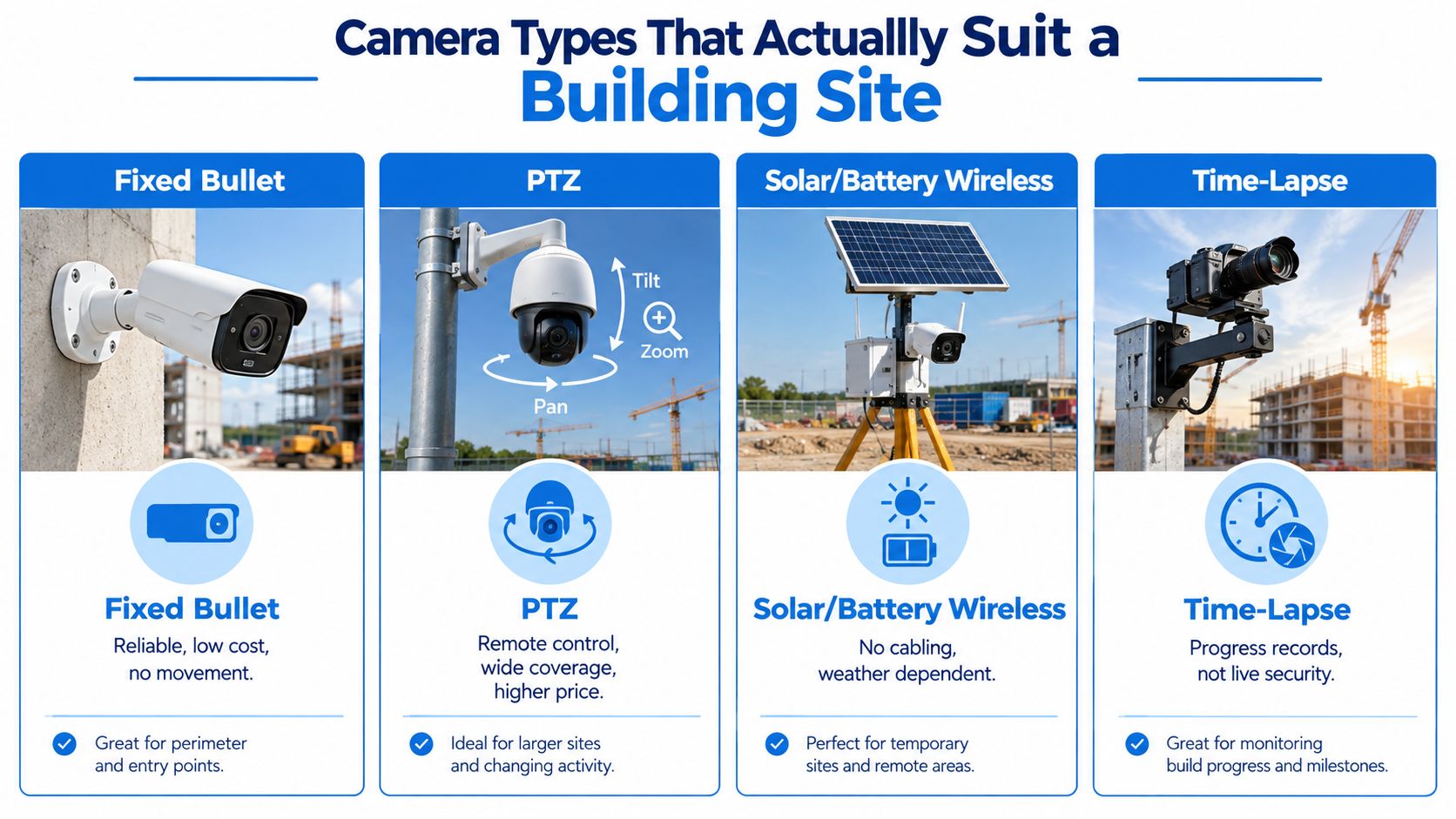
Fixed, PTZ, wireless and time-lapse
Fixed bullet cameras are the workhorses. They belong at gates, storage containers, and material compounds because the field of view stays predictable and the evidence is easier to defend. A camera that doesn't move is often more useful in a dispute than one that keeps panning around.
PTZ cameras suit bigger sites where one operator needs to sweep multiple zones from a single mount. On a larger Caulfield townhouse development, one PTZ can cover more ground than several fixed cameras, provided someone is monitoring or reviewing its movement pattern. It's a control tool, not a miracle device.
Solar or battery wireless cameras are the practical answer when the site is messy and mains power isn't ready. They fit the transitional stage of a renovation where the fencing is up, the power is temporary, and nobody wants a cable run across a half-built frontage. Their weakness is obvious, they depend on battery management and weather discipline.
Time-lapse rigs are a different category altogether. They're useful for progress records, handover documentation, and marketing footage, but they're not security-first devices. A builder who buys a time-lapse rig and expects it to replace a real security camera is buying the wrong tool for the problem.
Resolution and night use
Resolution matters, but only after placement is right. 1080p is the floor, 4MP is a practical middle ground, and 4K makes sense where faces, licence plates, or small site details need to hold up later. Night performance also depends on the block itself. A street-lit Glen Iris frontage is a different problem from an unlit rear boundary in Brunswick, so the camera choice should reflect what the lens sees after dark, not just the spec sheet.
Audio is a separate issue. Video records a scene, listening devices capture conversations, and Victorian law treats those differently. A builder who wants to keep things clean should treat audio as optional and only use it where there's a documented lawful reason.
Ranked recommendation for most Melbourne sites
Fixed bullet cameras, for gates and storage.
PTZ cameras, for larger or changing compounds.
Solar or wireless cameras, for temporary or unpowered sites.
Time-lapse rigs, only when progress footage is also needed.
Power, Connectivity and Storage Options
The camera is only as good as the way it's powered and fed. On a working Melbourne site, that means dealing with mains, solar, cellular signal, and storage before anyone gets excited about image quality. A system that looks tidy in the showroom can fail on the jobsite if the battery drops out after a wet week or the signal vanishes over a long weekend.
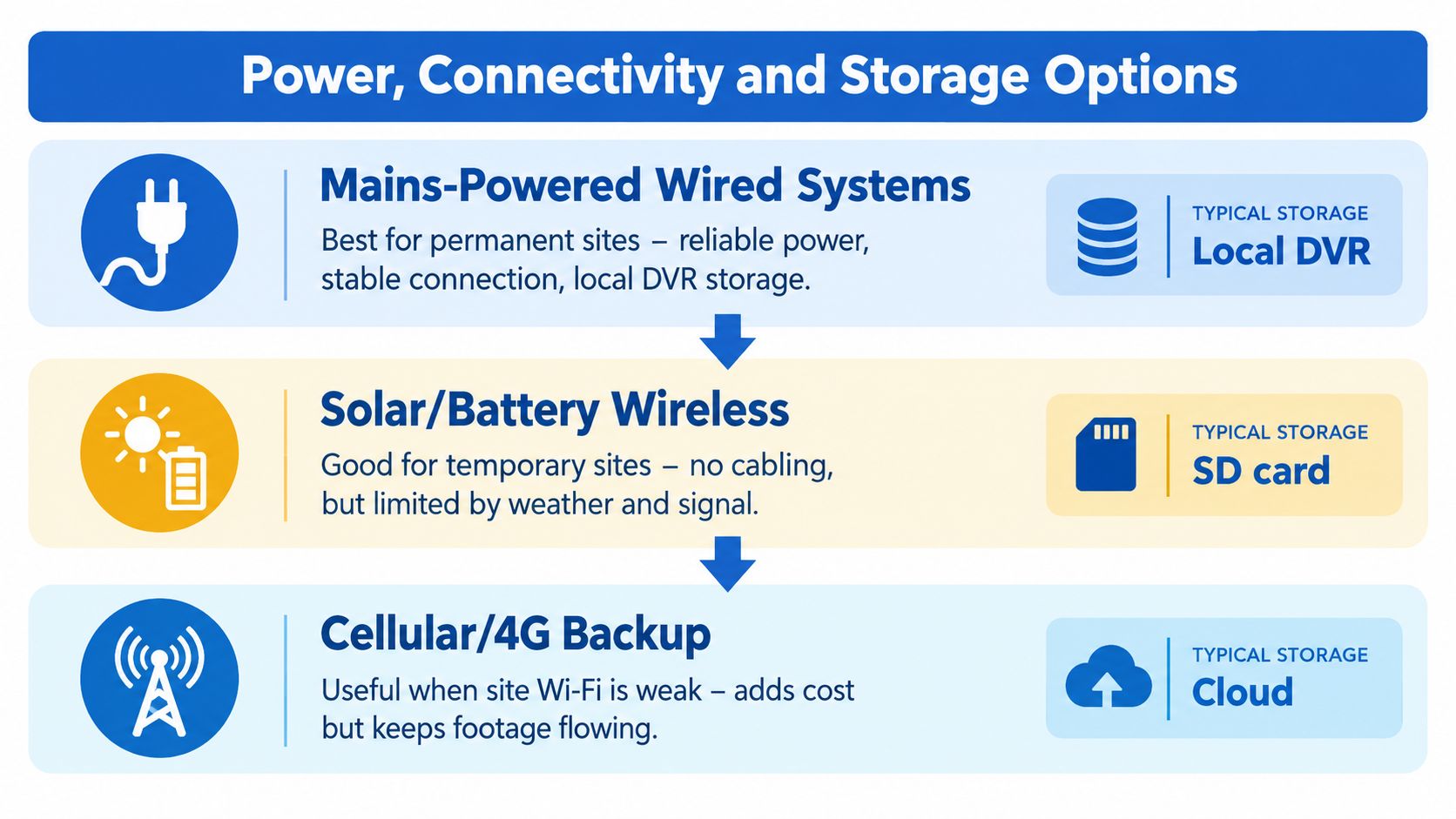
What actually works on a suburban block
Mains-powered wired systems are the right answer for permanent compounds. They need a proper switchboard tie-in and, in practice, a licensed electrician. The payoff is stable power, stable recording, and better long-term reliability. If the site is staying put, this is the cleanest option.
Solar with battery suits a Glen Iris knock-down-rebuild or a site where temporary power isn't practical yet. It keeps the camera independent of the home's active services, which is handy when the build is still early stage. The trade-off is that weather, panel placement, and battery management become part of the maintenance routine.
Cellular 4G or 5G is the answer when NBN hasn't been activated yet or the site can't rely on local network infrastructure. It gives remote viewing and alerts without waiting on internet build-out, but the builder has to manage the SIM and accept the ongoing data burden. If that link drops, the footage still has to be there locally or in the cloud.
Storage that survives a real site
Storage choices need the same blunt treatment. On-board SD cards are fine for short projects or backup recording, but they're not ideal if the camera itself is stolen. NVRs suit multi-camera permanent installs because they centralise local footage and give a cleaner handover. Cloud storage is the better answer when the builder wants off-site evidence access and a stronger chain of custody.
A camera that records locally and backs up remotely is harder to defeat than one that depends on a single box on site.
The practical failure modes are easy to name. A hotspot can drop out during a long weekend. NBN activation can be delayed. A solar battery can flatten after a run of poor weather. That's why resilience matters more than headline specs. A builder should ask one question before signing off a system, what happens if the first power or network choice fails?
For a Melbourne project, the best setup is the one that keeps recording when the site goes quiet, not the one with the fanciest brochure language.
Victorian Privacy and Surveillance Rules That Actually Apply
Cameras on a Melbourne construction site are not free-fire territory. Victorian law matters, and the line gets crossed quickly when a builder points a lens at amenities, neighbouring property, or conversations that should never have been recorded in the first place. The safest approach is to assume the camera map will be judged later, so it has to be clean now.
The Surveillance Devices Act 1999 restricts the knowing use of optical or listening devices to observe private activity or overhear private conversation without the consent of each relevant party. In plain English, that means no audio unless there's a documented lawful reason, no lens aimed into change rooms or toilets, and no casual overlap into private neighbouring spaces. Victorian guidance also notes possible penalties of up to $5,000 and 12 months' imprisonment for an individual, or $50,000 for a body corporate Workplace surveillance guide.
What privacy compliance looks like on site
Where the Privacy Act 1988 applies, footage that identifies workers, visitors, neighbours, or delivery drivers can count as personal information. That means the builder needs a real policy for how the footage is handled, not a verbal understanding that “only the site manager looks at it”. The Office of the Australian Information Commissioner says organisations should notify people before recording, secure recorded information, and destroy or de-identify it when it's no longer needed OAIC camera guidance.
A proper setup should include:
Visible signage at entry points.
Role-based access instead of shared logins.
Encryption and multi-factor authentication where supported.
Logged access whenever footage is opened or exported.
A retention rule tied to incident response, not endless storage.
The Victorian workplace-surveillance inquiry went further and pushed the idea that monitoring should be reasonable, necessary and proportionate Victorian workplace surveillance information. That's the right standard for construction too. The builder doesn't need audio, biometric tricks, or a camera trained on the tea room to keep a site secure.
Blunt rule: if a camera sees more than the builder needs for security, it's too wide.
Camera positioning is the key control point. Mask neighbouring properties, public footpaths where possible, worker amenities, and any area that isn't part of the security purpose. Document the purpose, the field of view, and the retention period before commissioning. A site camera should protect property and support evidence. It should not drift into unnecessary worker surveillance.
For a property-specific privacy-and-security framework, a builder can compare those controls with the way a small-business system is usually scoped on a privacy policy reference page, then strip it back to the narrower needs of a site.
Monitoring, Insurance and the Response Workflow
A camera that nobody watches still records useful evidence. A camera tied to a response workflow does the job properly. The point is to move from alert to action without losing the evidence trail.
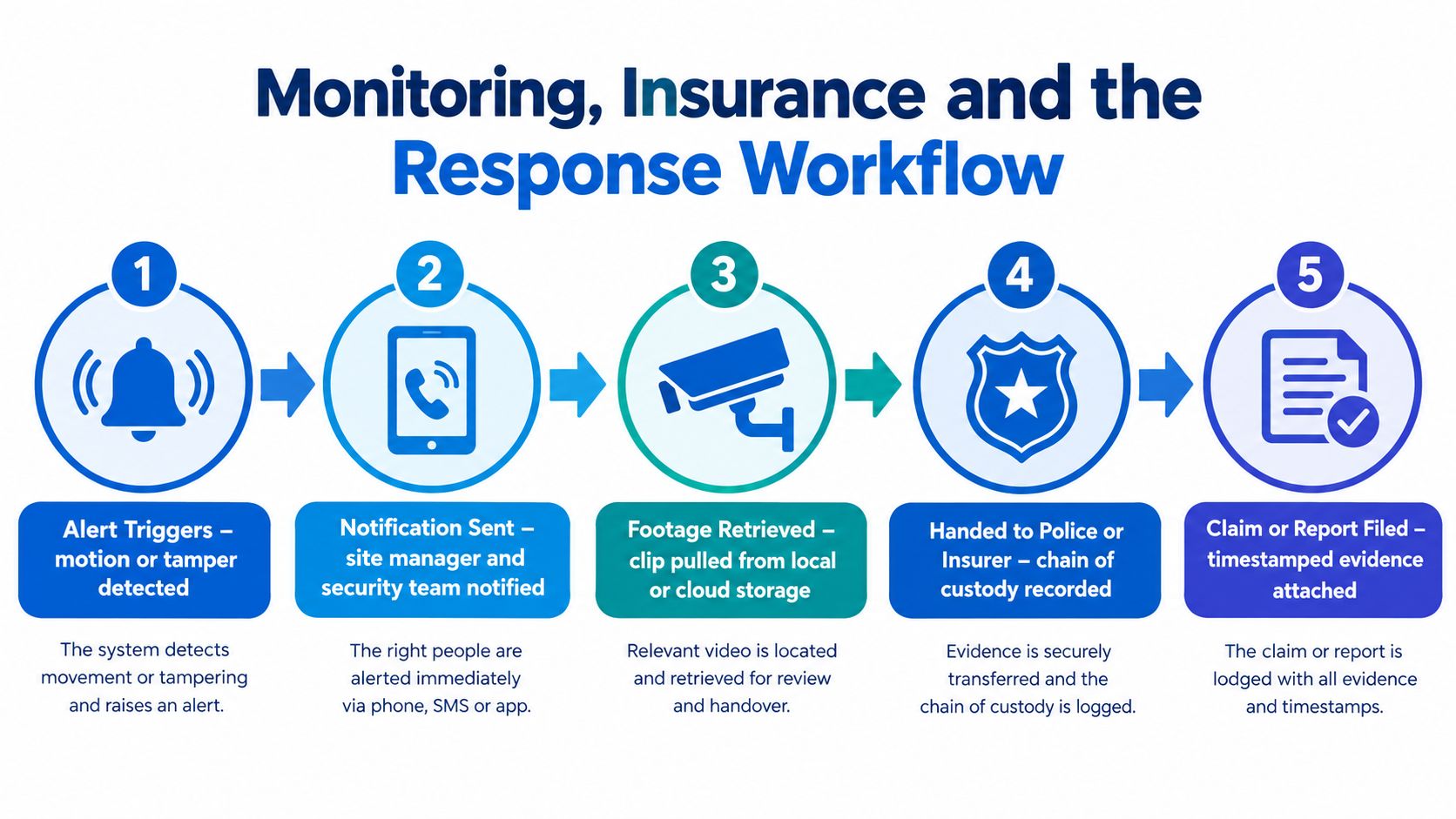
How a real alert should move
Start with self-monitoring if the site is small and someone checks alerts after hours. Use shared monitoring when a nominated neighbour, foreman, or site manager can confirm whether the trigger is noise, weather, or a real intrusion. The third option is 24/7 professional monitoring, where an operator follows the event and escalates it properly, the model outlined on PeakFriend's 24/7 monitoring page.
On a rear-fence alert at 2am, the workflow should be plain and disciplined. Motion triggers the alert, the site manager receives it, footage is opened, the clip is saved, and the event is handed to police or the insurer if needed. A chain of custody matters because time-stamped, cleanly exported footage carries more weight than a random screen recording on someone's phone.
What insurers care about
Insurers want proof, not stories. QBE's construction sector outlook links theft risk to volume housing developments before occupation, and points to surveillance cameras, on-site security personnel, and secure storage for valuable materials and equipment QBE construction sector outlook. That means the camera system should support the claim process, not just record what happens.
Keep exports in a format that preserves metadata, with time-stamped clips ready for handover. The retention window should cover the likely claim cycle, but it should not drift into open-ended storage. Footage must be easy to find, easy to export, and easy to explain when an insurer asks for it.
For a builder who wants alerts escalated by an operator rather than sitting unread in an app, an installed system with 24/7 monitoring covers that gap, and PeakFriend Security provides this across Melbourne properties.
A Staged Commissioning Plan for the Build
A good handover isn't a pile of screenshots. It's a camera map, a working set of views, and a record of what the system is allowed to see. The build changes, so the camera setup has to change with it.
Re-aim at each stage
Excavation, frame, lock-up, and fit-out each create different blind spots. Hoarding shifts, scaffolding changes sightlines, lighting gets moved, and material storage migrates across the site. That's why the camera should be re-aimed instead of left to drift for months.
The commissioning checklist should be straightforward and mandatory:
Signage at every entry point.
Masked zones for neighbours and worker amenities.
Time-accurate timestamps.
Day and night image tests.
Audio disabled unless documented.
Encryption turned on.
Role-based accounts set up.
A retention rule defined.
An export process ready for police or insurer requests.
Keep the camera map, the field-of-view photos, and the commissioning checklist in the same folder as the building permit and the contractor sign-on sheet. That way, the site manager and the next subcontractor can see what is being recorded and why without guessing. The handover folder should be treated as site control paperwork, not as an afterthought.
A Melbourne-based installer who can re-aim cameras at each phase is worth more than a technician who turns up from three suburbs away, fits the hardware once, and never comes back. A site camera setup lives or dies on small adjustments, and a suburban block changes too quickly for a set-and-forget approach.
If the site needs cameras that are mapped, installed, and monitored with Melbourne conditions in mind, PeakFriend Security handles that kind of work across homes and small-business properties. Visit PeakFriend Security to arrange a property-specific security assessment and get a camera plan that fits the block, the build stage, and the legal lines that matter.