
Residential Alarm System Guide: Parts, Monitoring, Upkeep
In Australian research, 49.1% of surveyed burglars identified a working alarm system as a deterrent, according to the Australian Bureau of Statistics home security summary. That figure explains why a residential alarm system still matters, but only if the system completes a simple chain. It must detect an entry, communicate the event, and trigger a response that someone will act on.
Table of Contents
Why Melbourne Homes Still Need an Alarm Beyond Locks
The Australian Bureau of Statistics crime victimisation release shows 1.8% of Australian households, approximately 196,600 households, experienced a break-in in 2024–25, while 2.0%, or about 217,500 households, experienced an attempted break-in. Completed break-ins can fall while attempts stay common, so the case for an alarm doesn't depend on panic about rising crime.
A lock is a closed door. A residential alarm system works more like a smoke alarm for the house, because it rarely prevents the first moment of trouble but turns a hidden event into an immediate warning.
The chain that makes an alarm useful
That warning matters only in sequence. Contacts and sensors detect, the panel and communicator communicate, and an occupant, keyholder, or monitoring operator must respond. If any link fails, the hardware becomes decoration.
The Australian Institute of Criminology household burglary paper cited Western Australian Police advice that home alarms are effective as deterrents only when they are turned on. That's the quiet failure many owners miss. Arming habits, reminders, and remote status checks matter as much as sensor quality.
Practical rule: Decide first whether the main job is deterrence, evidence, or verified response, then buy parts to suit that job.
Readers who want evidence as well as detection should also plan camera placement, storage, and privacy, as outlined in this guide to choosing a CCTV camera for home use. The parts that follow, the wired versus wireless decision, monitoring choices, false alarm fixes, suburb checks, and upkeep schedule all serve that first decision.
The Parts of a Residential Alarm System and What Each Does
A residential alarm system isn't one device. It's a set of parts passing information along the detect, communicate, respond chain, and confusion usually starts when a sensor is expected to do the panel's job, or a siren is expected to create a response by itself.
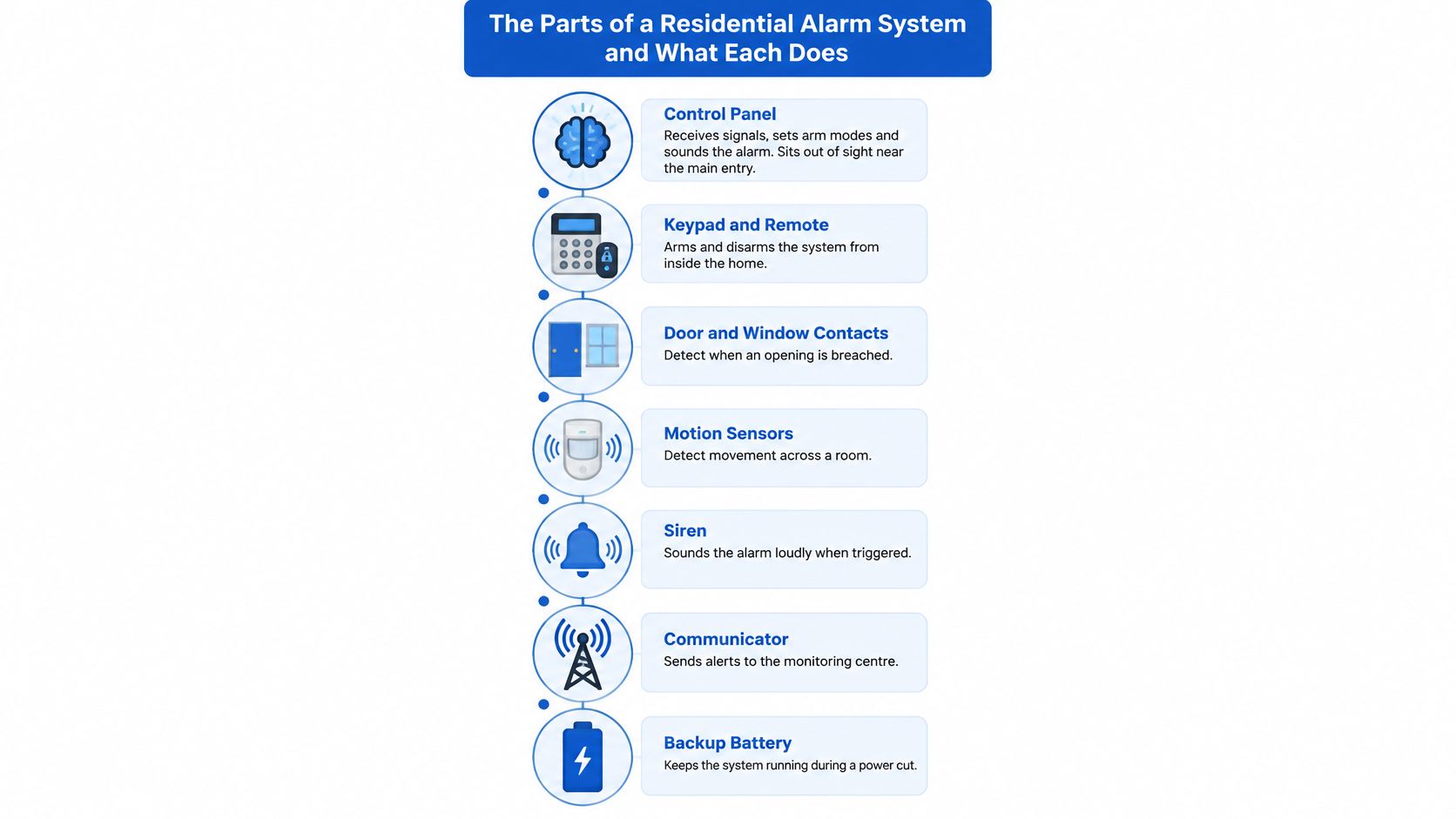
The diagram below shows the parts in the order a household usually meets them, from the brain to the battery that keeps it alive during a power cut.
Control, entry, and detection
The control panel receives signals, sets arm modes, and sounds the alarm. It normally sits out of sight near the main entry, because an intruder shouldn't be able to reach and disable it during the entry delay. The keypad or touchscreen is the part people touch daily. It arms and disarms the system, shows open zones, and displays faults, so user codes and entry delay settings need checking at handover.
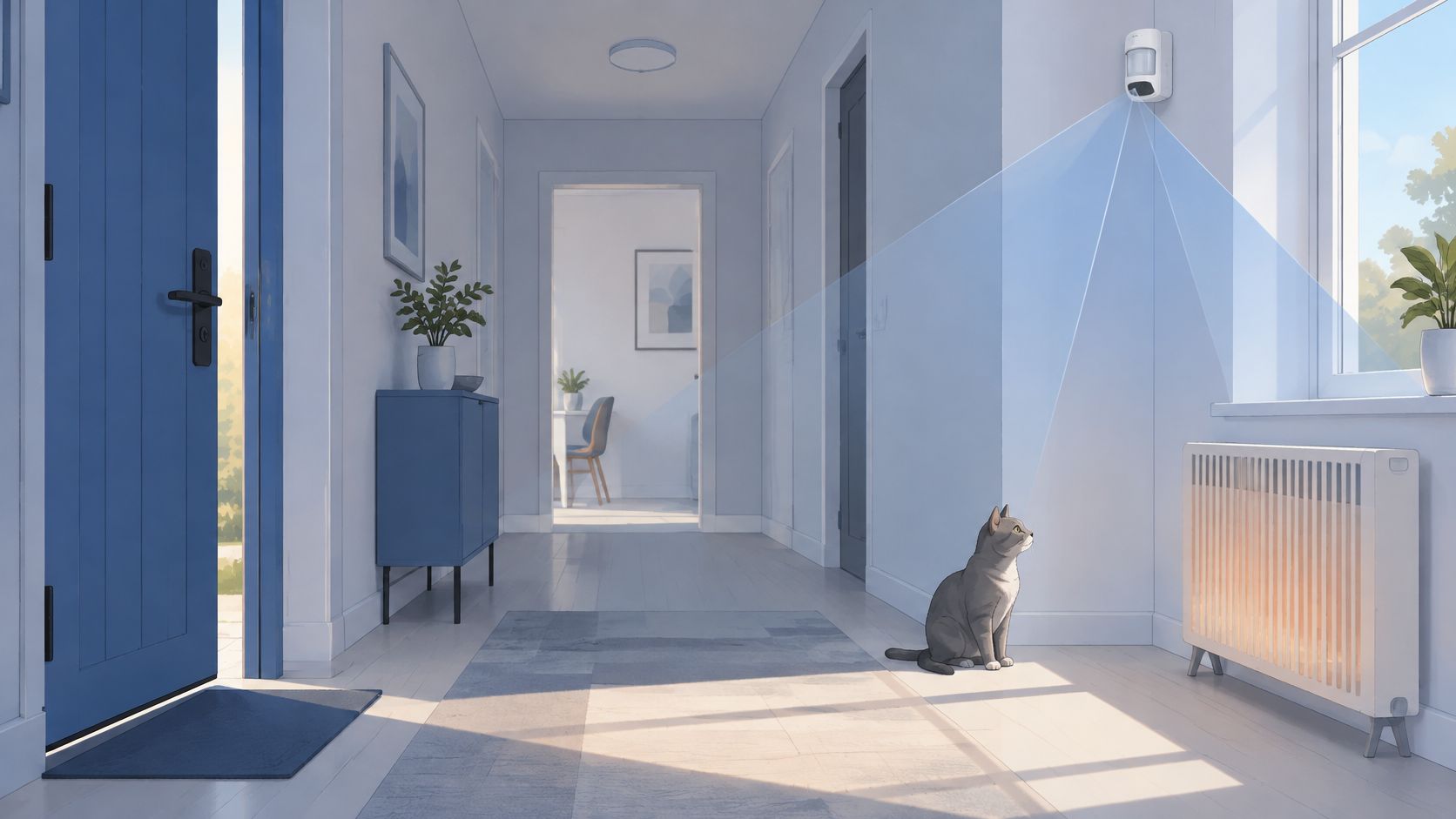
Door and window contacts detect an opening separating. Count every openable door, ground floor window, garage door, and sliding door separately, because one shared zone for several openings makes faults hard to locate. Passive infrared motion sensors, called PIRs, detect body movement inside a room. Corner placement usually covers hallways and living areas best, provided the sensor isn't aimed at heaters, air conditioners, or sunlit glass.
Warning, communication, and verification
A glass-break detector listens for breaking glass and suits large or exposed glazing where a contact might not trip until a window opens. Internal and external sirens create urgency and deterrence, but they don't summon help. That job belongs to the communicator, which sends events to a phone or monitoring centre, backed by a backup battery during power failure.
Cameras sit outside the core alarm chain. They add verification by showing what triggered an event, which helps separate a person at the side door from a curtain moving near a PIR.
Component | What it does | Typical placement | Key check |
|---|---|---|---|
Control panel | Receives signals, sets arm modes, sounds alarm | Hallway or cupboard near main entry | Mains supply plus battery backup |
Keypad or touchscreen | Arms and disarms, shows zone status | Beside the main entry, at standing height | Confirm user codes and entry delay |
Door and window contacts | Detect an entry point opening | Every openable door, ground-floor window, garage and slider | One zone per entry point |
Passive infrared (PIR) motion sensor | Detects body movement inside | Room corners covering hallways and living areas | Aim away from heaters and direct sun |
Glass-break detector | Listens for glass breaking | Living area facing large windows | Only where glazing is large or exposed |
Internal siren | Loud alert and deterrent inside the home | Hallway, audible from bedrooms | Check volume and siren duration setting |
External siren | Alerts neighbours and deters from outside | High on a wall, out of easy reach | Weatherproof rating and tamper protection |
Communicator | Sends events to monitoring centre or phone | Near the panel, with good mobile signal | 4G with VoLTE support |
Backup battery | Keeps the system running in a power cut | Inside the panel enclosure | Replace on the manufacturer's interval |
Camera (optional) | Shows what triggered the alarm | Entry points and approach paths | Storage, retention and privacy settings |
Before paying a final invoice, the homeowner should walk each entry point while another person watches the panel. Every opening should appear as a named zone, such as rear slider or garage pedestrian door. Unnamed zones slow down every later fault, because nobody knows which device needs attention.
Choosing Wired, Wireless or Hybrid for Your Home
The labels are simpler than sales language suggests. A wired system runs cable from every sensor back to the panel, a wireless or wire-free system uses battery sensors talking by radio, and a hybrid combines both where each method suits the building.
Installation disruption separates them first. Wired sensors need cable through walls and ceilings, while wireless sensors need no cable run and usually mount with minimal drilling. Reliability also differs in practice. Wired connections stay steady once installed, while wireless links depend on signal strength at each exact mounting point, with brick, metal reinforcement, and distance all reducing range.
Match the method to the building
Upkeep reverses the convenience story. A wired residential alarm system mainly needs the panel backup battery and any wireless keypad batteries changed, while a wireless system needs a battery change on every sensor. Expansion is easier with wireless within range, while wired expansion can mean new cable runs through finished rooms.
Choose wired when building or renovating: cable is cheapest and neatest while walls and ceilings are open.
Choose wireless for rentals and retrofits: it suits single-storey homes, heritage-listed properties, and places where drilling is limited.
Choose hybrid for older Melbourne brick homes: wired contacts can protect main doors near the panel, with wireless sensors covering garages, sheds, and rear extensions.
Test radio signal at the final sensor position before mounting, not while standing beside the panel holding the device.
Three questions settle most quotes. Does the household own the home, are walls or ceilings already open, and how many zones will be needed now and later? If ownership is temporary or walls are closed, wireless usually wins. If the home is being built and the zone count is high, wired usually wins.
Monitoring Options and Who Answers When the Siren Sounds
Monitoring is often sold by features, yet the useful question is human. Who answers when the siren sounds, and what do they do next? A loud siren may deter, but deterrence, evidence, and verified response are different outcomes that need different arrangements.
Monitoring level | Who responds | Response pattern | Upkeep needed | Best for |
|---|---|---|---|---|
Self-monitoring (app alerts) | You or a household member | Only if someone is nearby and sees the alert | Keep app and phone notifications on | Homes where someone is usually present |
Keyholder call-out | Monitoring centre calls listed keyholders | Calls keyholders in order after an event | Keep the keyholder list current | Families with nearby contacts |
24/7 professional monitoring | Operator verifies, then escalates | Immediate operator review, escalated under the agreed path | Communicator tests and contract review | Homes often empty, shops and properties with high exposure |
Siren-only (no monitoring) | Neighbours or no one | Deterrent sound only; no remote event | Local siren and battery checks | Low-risk, short-term or secondary properties |
Why verification changes the response
Self-monitoring depends on a phone being charged, audible, in coverage, and noticed quickly. Keyholder call-out improves that chain only if listed contacts still live nearby and answer unknown numbers. Professional monitoring adds an operator who can review which zones triggered, check available camera clips, and separate a likely intruder from a pet, cleaner, or faulty contact before escalating under the agreed path.
Siren-only systems have a place for a secondary property or short-term need. They shouldn't be mistaken for monitored protection, because no event leaves the building unless a neighbour hears and acts.
Households comparing operator arrangements can review how professional alarm monitoring is structured before signing a contract. The right level depends on who is home, how close the nearest keyholder lives, and how long the property sits empty.
The communicator check many owners miss
The Therapeutic Goods Administration 3G closure notice records that Telstra and Optus switched off their 3G networks from 28 October 2024. Some alarms relied on 3G for data or voice even when marketed as 4G-compatible. The dangerous result is easy to miss: the siren sounds locally, the app may look normal, but the monitoring centre receives nothing.
Ask any provider five direct questions before installation:
Which events are sent: alarms only, or also mains failure, low battery, and restoration?
Who verifies: does an operator review sensor or camera information?
How is it tested: is alarm-event delivery proven at the final communicator position?
Is it truly current: is the communicator confirmed as 4G with VoLTE support?
Who is called: are keyholders named, ordered, and current?
A successful local siren test doesn't prove off-site transmission works. Insist on an end-to-end test to the phone or monitoring centre.
Cutting False Alarms Without Creating Blind Spots
Most false alarms come from two ordinary faults. A PIR is aimed at something that moves or changes temperature, or a door contact isn't sealing cleanly. Disabling that device stops the noise, but it also removes coverage from the entry the household wanted protected.
The hallway below shows the common tension clearly, because a motion sensor must notice a person crossing the space without treating every pet movement as an intrusion.
Trigger | Likely cause | Fix that keeps coverage |
|---|---|---|
Motion alarm when no one is home | Pet, curtain or heater airflow in the PIR view | Re-aim the sensor, use a pet-immune model, lower sensitivity one step |
Entry alarm on a morning door | Door not fully closed or a worn latch bouncing the contact | Adjust the magnet gap and check the latch alignment |
Siren at dawn or dusk | Sunlight through glass or temperature swings near a sensor | Move the sensor away from the window or add a shade |
Repeated trips from one zone | Faulty contact or no lockout after repeat trips | Replace the device and confirm the zone lockout setting |
Alarm when power returns | Low backup battery or mains-failure reporting fault | Replace the battery and test mains-failure reporting |
Camera alerts from the street | Analytics detecting passing vehicles or footpath traffic | Mask public areas and narrow the motion zone to the entry |
Fix the cause in order
Camera analytics add a second source of nuisance. Person and vehicle detection can reduce irrelevant notifications, but a camera watching a footpath, busy road, or neighbour's driveway can generate alert fatigue. Once a household starts ignoring notifications, the response chain has failed even though the hardware still works.
Review the event log: group triggers by zone and time before changing settings.
Find the repeat device: focus on the sensor or contact responsible for most events.
Check mounting and aim: confirm height, direction, and distance from heaters or windows.
Adjust one step: lower sensitivity slightly rather than switching detection off.
Test for 48 hours: run the system armed, then review the log again.
Tighten camera zones: exclude public areas while keeping the entry path covered.
The short video below is useful for seeing how sensor view and room layout affect what a device reports before any settings are changed.
Privacy settings belong in the same fix. Choose cloud storage for off-site backup or local recording to keep footage on site, set retention in days rather than months, limit app access to named household members with strong sign-in protection, and angle cameras so neighbouring windows and driveways stay out of frame. A false alarm is a configuration problem to solve, not a reason to create a blind spot.
Matching Your System to Your Melbourne Suburb and Property
A statewide average can't tell a household in Brunswick, Frankston, or Essendon how heavy its system should be. Local layout and local recorded crime should shape the design before any brand is discussed.
The Australian Bureau of Statistics recorded crime victims data recorded 45,893 burglary victims in Victoria in 2024. That is a state figure, not a suburb risk score. The Crime Statistics Agency publishes Victorian recorded crime by local government area and updates it quarterly, so the practical first step is checking the relevant council area.
The street view below captures why a property walk matters, because concealment, side access, and sightlines from the footpath differ from one Melbourne street to the next.

Walk the property after dark
Darkness reveals what a daytime quote visit can miss. Side paths disappear behind fences, rear doors sit in shadow, and garage entries become separate buildings rather than part of the main house plan.
List every entry point: include side gates, garage doors, sheds, and accessible windows.
Mark hidden approaches: note paths screened from the street or neighbours.
Identify occupied rooms: record where people sleep, work, and move at night.
Set stay zones: decide which contacts or sensors remain live while occupants are home.
Match devices to weak points: place detection where an approach is likely, not evenly everywhere.
Property types need different emphasis
A detached house with side access usually needs contacts on the rear door and accessible side entries, internal motion covering the hallway, and an external siren. A townhouse or unit with shared walkways needs ground-floor window and balcony slider contacts, plus a strata check before any external camera is mounted. Rentals need written approval from the rental provider, so removable wireless sensors and a video doorbell often suit best because the property can be restored at lease end.
Small shops and offices face a different pattern. After-hours perimeter contacts, internal confirmation, and monitored verification come before extra daytime features. Sketch the property, mark entry points and planned sensor positions, and give that sketch to the installer. One shared plan prevents the common gap where the owner imagines the shed is covered and the installer prices only the house.
Maintenance Checks and the Annual Service Schedule
A residential alarm system is only as reliable as its last test. Batteries weaken, magnets drift, radio links change after renovations, and a communicator can fail without warning while the panel looks calm. Maintenance turns those hidden faults into scheduled checks.
The checklist below summarises the records and tests that keep the detect, communicate, respond chain working after installation day.

Start with the commissioning record
Every installer should hand over a record listing each zone, its purpose, detection technology, coverage limits, test result, and maintenance interval. The handover should also explain arming modes, entry delays, bypass rules, and reset steps in plain language. Without that record, later service becomes guesswork.
Australian installation and maintenance should be designed around AS/NZS 2201.1:2007, which specifies requirements for the construction, installation, operation, commissioning, and maintenance of intruder-alarm systems at client premises, including wire-free systems. In practice, the annual service should verify detector operation, tamper circuits, backup-battery condition, radio links, siren operation, and communication-path reporting.
Interval | What to test | Who does it | Pass result |
|---|---|---|---|
Monthly | Arm the system, trigger one sensor per zone, confirm the alert | Homeowner | Alert received in the app or by the monitoring centre |
Every three months | Battery indicators, panel clock, camera recording and storage | Homeowner | No low-battery warnings; correct time and recordings present |
After any power outage or storm | Panel status, mains-failure reporting, communicator | Homeowner, then installer if faults show | Restoration event received and no faults on the panel |
Per manufacturer's schedule | Backup battery and wireless device battery replacement | Installer or trained homeowner | Replacement logged with the date |
Run a monthly test that proves the chain
Arm the system, trigger one sensor in each zone, and confirm the alert reaches the app or monitoring centre. Then disarm, check that the event time is correct, and log the result with the date. Extra checks are sensible after a power outage, storm, renovation, or communicator change, because each event can affect power, cabling, signal, or sensor aim.
Pass standard: detection at the device, arrival of the alert, and a clear panel afterwards. One without the others isn't a pass.
Book a Property Assessment Before You Buy Hardware
Hardware bought before a property assessment often protects the rooms that were easiest to imagine, not the entries an intruder would realistically use. Bring a floor plan, a list of keyholders, the rental agreement if applicable, and details of any existing alarm. Mark hidden entry points and note the council area's latest recorded crime figures, because both shape zone design and monitoring choice.
PeakFriend Security is a Melbourne provider based in Malvern, offering a free property assessment with a written protection plan delivered within one day, and its security assessments are performed by a licensed installer. PeakFriend designs every system around the site, the people using it, and the level of risk, and works with Hikvision, Ajax, Dahua, Bosch, and Uniview. Readers planning the installation stage can also review what's involved in professional security systems installation before the visit.
Ask for written confirmation that the communicator supports 4G with VoLTE. The outcome should be a clear plan listing zones, devices, monitoring level, communicator type, and maintenance schedule.
Book a property-specific assessment with PeakFriend Security to turn a floor plan, entry-point sketch, and council check into a written residential alarm plan covering zones, devices, monitoring, communicator type, and servicing. Visit PeakFriend Security to arrange the assessment before buying hardware that may not suit the property.