
Security Alarms for Business: A Melbourne Owner's Guide

Closing the roller door in Malvern, Richmond, Footscray or Dandenong should feel like the end of the day, not the start of a worry list. Yet plenty of owners still lock up, glance back at the counter, and wonder whether a single siren is enough if someone forces the back door, slips through a side window, or walks out with stock while staff are still on site.
Security alarms for business should be treated as a property decision, not a product category. The right setup depends on what needs protecting, when it's exposed, and who can reach it, because a shop, office and warehouse do not lose the same way.
Table of Contents
Why a Single Siren Is No Longer Enough for Your Business
At closing time, the question isn't whether an alarm makes noise. It's what the business is trying to stop. A front-of-house retail strip in Richmond faces different risk than a quiet office in Malvern or a warehouse in Footscray, and the alarm has to match that layout, not some generic brochure.
Start With the Loss Pattern, Not the Box
A Melbourne owner should sort the site into one or more of four loss patterns. After-hours entry burglary means someone tries to get in when no one is there. Internal theft means the problem starts inside the building, not at the front door. Shoplifting during trading hours needs visibility and evidence, not just a siren. After-hours only occupancy is the tricky one, because a cleaner, contractor or lone worker can be on site without enough eyes on every door.
That distinction matters because the Australian Bureau of Statistics treats burglary of a non-residential building as a distinct offence category, and its definitions cover structures such as retail premises, factories, offices and storage buildings, including cases with no obvious forced entry. The same methodology also notes that separate commercial occupiers in the same building may be counted separately if each leased area is unlawfully entered, which is exactly why a multi-tenant property needs more than one layer of protection. ABS methodology on recorded crime victims
Practical rule: if the loss happens before anyone notices, the alarm needs perimeter detection and notification. If the loss happens while people are inside, the system needs cameras, procedure and evidence.
Decide What Needs Detecting, And When
A siren only reacts after a detector has already seen trouble. That's fine for a small room with one entry point, but it's too thin for a site with a roller door, staff access, stockroom, loading bay and a public front door. A good alarm plan says which entrances are watched after hours, which internal areas are covered when the place is open, and which spots need recorded proof if something goes wrong.
The owner should be able to answer three direct questions before asking for a quote. What hours is the building empty? Which doors and windows can a person reach without being seen? Who is responsible for checking the system when the building is shut?
If that answer changes by suburb or building type, the alarm spec should change with it. That's the whole game.
The Layered Approach Explained From the Front Door Back

Walk a shop floor from the street front to the cash area and the logic becomes obvious. The front layer keeps people out, the middle layer catches movement, the third layer confirms what happened, and the last layer gets the right people moving. A siren sits inside that chain, not at the centre of it.
Front Edge First
Victoria Police recommends a layered approach for securing business premises, including cameras and a monitored alarm system, good-quality locks, solid doors, steel door jambs for external doors, window security, exterior lighting, trimmed vegetation, and secure fences and gates. That advice lines up with the way a real building works. A door contact on a front entry, a contact on a roller shutter, and a sensor on a vulnerable window all do different jobs. Victoria Police business-premises guidance
Perimeter protection should tell the system that someone is trying to enter before they're standing in the stockroom. Interior motion should then cover the spaces people would have to cross to reach valuables. Verification cameras should sit where a person can be identified, not just where a wall can be watched.
Response Has To Be Planned, Not Assumed
A siren can discourage a thief, but it doesn't tell the owner what happened. A monitored alert, app notification, or call to a keyholder is what turns detection into action. That's why the response layer has to be written down, tested and current.
A noisy alarm without verification is just a loud guess.
For a simple mental checklist, the owner should walk the site and ask, front to back, “What stops entry here, what sees movement here, what records proof here, and who gets notified here?” If a space can't answer one of those questions, it's under-protected.
Choosing the Right Alarm Tier for Your Property
Most Melbourne SMB quotes land in one of four buckets. The right one depends on trading hours, stock value and whether anyone sleeps on site, not on how much gear can be squeezed into the proposal. A corner shop in Richmond doesn't need the same architecture as a multi-tenant warehouse in Dandenong.
Match the Tier to the Site
Tier | Property fit | Operating hours | Typical response |
|---|---|---|---|
Local siren only | Small office or low-risk internal area | Mainly attended, simple layout | Noise on site, no built-in verification |
Monitored alarm | Corner shop, suburban office, small warehouse | Closed overnight or often vacant | Alert to monitoring centre or keyholder |
Verified video | Retail, hospitality, mixed-use premises | Trading hours plus after-hours risk | Alarm event plus visual confirmation |
Fully integrated system | Multi-tenant retail, busy warehouse, higher-value site | Complex access, mixed occupancy, frequent deliveries | Alarm, camera clip, access log and remote response |
A local siren suits the simplest sites, but it's weak on evidence and weak on follow-through. A monitored alarm is the next sensible step where the building is empty for long stretches or the owner can't rely on anyone hearing the siren. Verified video makes more sense when police, insurer or manager need to see what triggered the event. Fully integrated systems suit properties where doors, staff roles and delivery access all overlap.
Think About The Building, Not The Brand
The Australian Standard AS/NZS 2201.1:2007 sets minimum requirements for intruder-alarm equipment and installed systems in private and commercial premises, including wire-free systems. That means the installed system matters more than the logo on the keypad. A neat-looking panel with no proper sensor map, no backup check and no service record is still a poor alarm.
For a Melbourne owner, the deciding question is simple. Is the site easy to empty and secure, or does it keep changing hands, keys and access patterns? The more complex the property, the more the system should combine alarm, camera and access control rather than rely on one device doing everything. AS/NZS 2201.1:2007 overview
Integrating Alarms With CCTV and Access Control
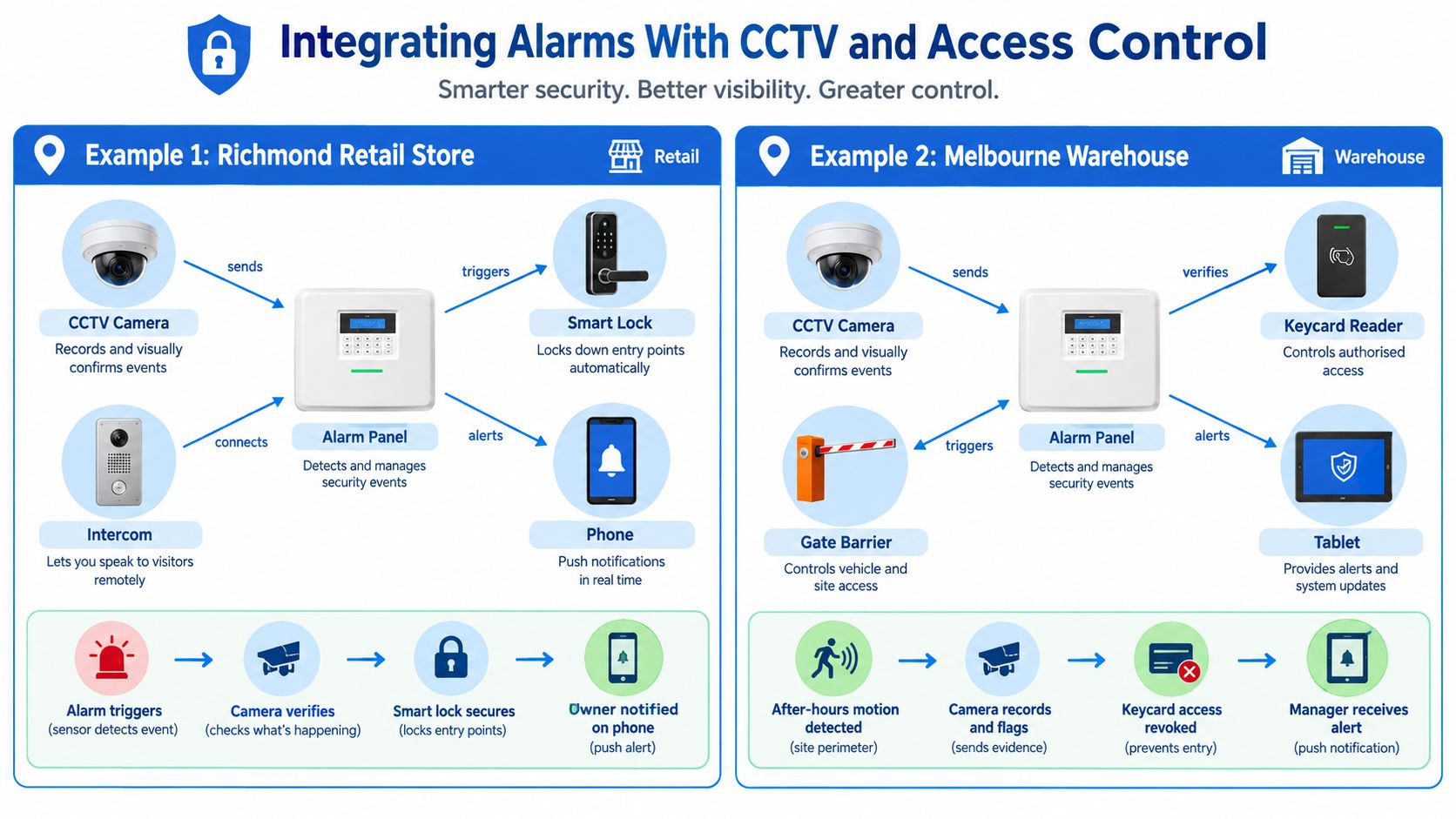
The alarm panel should not sit there like a lonely box on the wall. Once it talks to cameras, locks, intercoms and a phone, it becomes a workflow. That's where the system starts earning its keep.
A Richmond retail fit-out is a good example. A back-door contact trips, the camera above the loading entry saves a short clip, and the manager gets a phone alert before the person has even left the lane. That's far better than hoping the footage can be sifted later from hours of playback.
A Malvern professional office needs a different rhythm. Staff badges can arm and disarm the system, so the owner can see who entered, when they left, and whether the office was properly secured. That log is more useful than a vague memory from reception.
Position Cameras For Identification, Not Decoration
CCTV should face entry points, exit paths, payment counters, stockrooms and staff-only doors where those areas matter. A camera aimed too high, too low or straight into glare won't identify anyone. Video should verify the alarm, not just decorate the ceiling.
Useful test: if the footage can't show a face, a bag, a badge or a hand at the door, the camera placement needs work.
Event-linked clips are better than a wall of continuous video because they tell the owner what happened and when. They also save time during review and make the footage easier to hand to police or an insurer. For installers and owners looking at camera placement in a tighter retail environment, this Malvern CCTV installation guide is a useful companion reference.
Use Smart Access Where People Come And Go
Intercoms and smart door hardware matter when couriers, cleaners and trades need controlled access. A video doorbell can replace or supplement an intercom at a front entry, especially where the owner wants to speak before opening the door. That keeps the door closed until the visitor is verified.
For warehouses and offices with recurring staff movement, access control also stops old habits from becoming security gaps. A badge or code that opens a door should also create a record. If it doesn't, the business is still guessing who came and went.
Standards, Compliance and the Written Protection Plan
A business alarm should leave paperwork behind, not just a blinking keypad. That paperwork is what tells an insurer, a monitoring centre and the next technician how the system was built and how it should be maintained. AS/NZS 2201.1:2007 points the owner in that direction by setting minimum requirements for construction, installation, operation and maintenance, while AS/NZS 2201.5:2008 covers transmission paths to the monitoring side.
The right way to handle that is a written protection plan. It should name every zone, list detector locations, note where the panel sits, record battery and backup arrangements, and name the response contacts. It should also show when commissioning was done and how maintenance will be handled.

What The Installer Should Put In Writing
A one-page protection plan is enough if it's done properly. It should include the zone list, detector map, panel location, transmission path, test schedule, maintenance log, emergency contacts and an audit trail. That's the document a Melbourne owner can file and hand over without having to decode the whole installation again later.
The same approach helps when taking over an inherited system in a shop, office or warehouse. If a panel has been sitting there for years, the owner should not assume the batteries, zones or transmission path are still valid. Recommissioning is the time to verify all of it, not after a fault or break-in.
Keep The Record Set Tight
The owner should keep commissioning notes, service records, user handover details and any monitoring certificate that the provider issues where required. If a claim or fault review happens, missing records create delays that no business needs.
PeakFriend Security offers property-specific assessments, installation, maintenance and monitoring for alarm, CCTV and access systems, and it's one of the operators that can supply a written protection plan as part of that process. A plan like that matters more than a flashy app because it proves the system was tested and maintained as an operational control. PeakFriend Security installation overview
The Cyber and Operational Risks of App-Connected Systems
App-connected alarms are useful, but they add an administration layer that needs the same discipline as the hardware. The business doesn't just need to protect the premises. It needs to protect the account that controls the premises.
Who Holds The Master Login
A former manager who still gets alerts is a governance failure, not a small admin glitch. So is a shared password passed around a team with no record of who used it. The owner should control the master account, then assign separate roles for staff, managers and installers.
CPA Australia's 2025-26 small-business survey found 14% of Australian small businesses lost time or money because of a cybersecurity incident in 2025, and 45% had reviewed their cybersecurity protections during the previous six months. Those figures are a reminder that connected systems need account discipline, not blind trust. CPA Australia small-business survey summary
Build An Offline Back-Up Habit
If the NBN drops, the power fails, or the router gets replaced, the owner needs to know whether the alarm still reaches the monitoring centre or phone via another path. That question should be tested, not assumed. Battery health, backup connectivity and firmware status all need checking on a schedule.
If remote access is the only way a business knows the alarm is working, the business doesn't really know.
Recorded video should also be encrypted and kept only as long as necessary, with old users removed as soon as they leave. A clean access list and a documented offline response plan sit beside the written protection plan, not inside it. That combination keeps the system usable even when a connection or account goes bad.
Real Outcomes From Melbourne Sites That Got It Tuned Right
A Brunswick café that kept taking after-hours hits didn't need a fancier panel. It needed a system that could verify the event and show where the entry happened. Once the alarm was paired with video confirmation, the owner stopped guessing whether a noise in the lane was worth a response.
A Dandenong warehouse had the opposite problem. The system was too sensitive to movements around night-shift trucks, so the owner kept getting nuisance activations that trained everyone to ignore alerts. Repositioning the perimeter detectors fixed the false-alarm pattern and made the system usable again. Braeside warehouse case study
Tuning Beats Buying More Gear
A Malvern professional office later added smart locks and access logs, and the value wasn't the hardware itself. The owner finally had a clear record of who had been on site after hours and when the place was secured. That sort of visibility turns a security system into an operational tool.
The same pattern shows up across most Melbourne sites. Better placement, clearer rules and tighter access control matter more than adding another camera or another siren. The business needs a system that fits the property and the way people use it.
The wrong alarm installed perfectly is still the wrong alarm.
Your 30, 90 and 365 Day Action Plan
In the next week, the owner should ask for a property-specific assessment, not a generic package. The installer should walk the site, name the loss pattern, and produce a written protection plan with zones, detector locations and response contacts.
Within 90 days, the system should be commissioned, tested and handed over properly. User roles need setting, former users need removing, and one closing drill should be run so staff know exactly what locked, what armed and who gets notified.
By 365 days, the owner should book the annual service, check batteries and sensors, review the access list and retire anything unused. If the business has grown, changed tenants or added a new room, the security layout should change with it.
PeakFriend Security designs and installs security alarms for business premises across Melbourne, with alarms, CCTV, access control and monitoring built around the property rather than a generic package. For an owner in Malvern, Richmond, Footscray or Dandenong who wants the system mapped, commissioned and maintained properly, visit PeakFriend Security and ask for a property-specific assessment.